Skip to content

Features

Features for painters, fence builders & remodelers

Everything the office and the crew need, from the first call to the last payment. Features that aren’t on every plan show which plans include them.

Customers and pipeline

Every lead, quote, job and invoice on one board

The Work board shows each piece of work once, in the stage it has reached: Lead, Qualified, Quoted, Scheduled, In progress, Invoiced, Paid. The totals on top show what is in the pipeline, in production and still owed.

  • Contacts, companies and properties

    Customers, contractors and your own team, with every address, tag, photo, document and the full history in one place.

  • A 7-stage pipeline

    An opportunity becomes a quote, a job, then an invoice. The card moves on its own; nobody re-types anything.

  • Your services, your way

    Painting, fences, decks, remodeling or whatever you sell. Name your service types and filter everything by them.
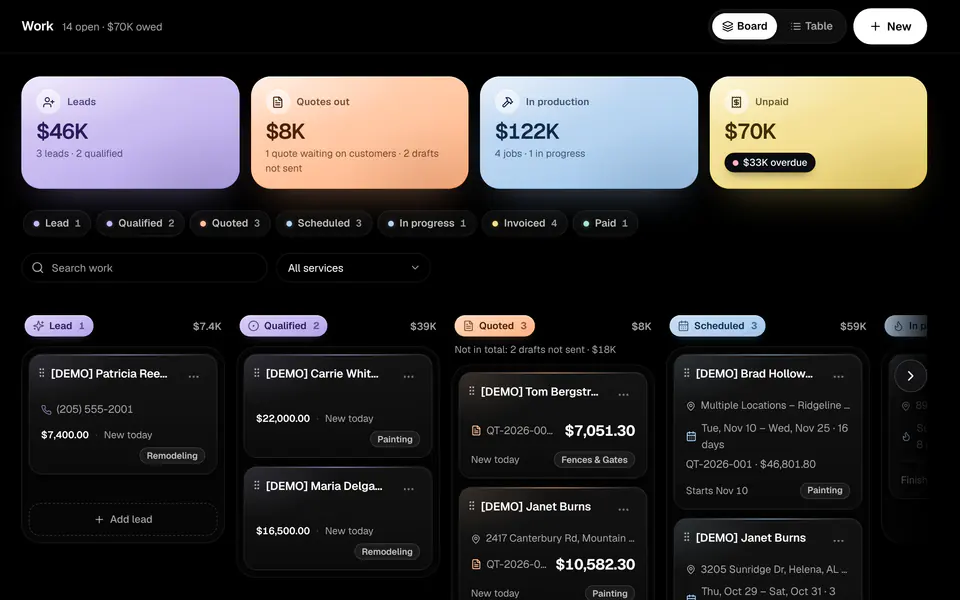
The Work board with lanes for Lead, Qualified, Quoted and Scheduled, and pastel totals for leads, quotes out, production and unpaid invoices

Quotes

Sketch it, measure it, quote it

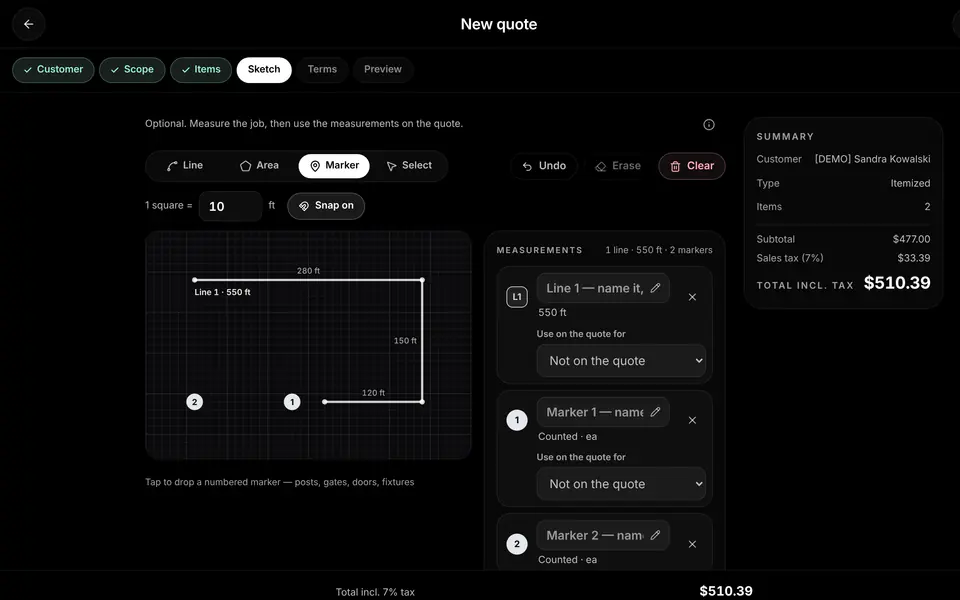
Draw the fence line, the deck or the walls on graph paper at the job site. Each measurement sets the quantity of a priced line, so the quote matches the drawing, and the customer approves and signs it online.

  • Sketch and measure

    Lines in linear feet, areas in square feet, and counted markers for posts, gates and fixtures. Works with touch, pen and mouse.

  • Price book with starter prices

    Starter prices for each trade that you edit once, then reuse on every quote.

  • Templates and options

    Quote templates for the jobs you do every week, good/better/best options and optional add-ons the customer can pick.

  • Online approval and e-signature

    The customer reviews the quote, picks options and signs online. The job is ready to schedule the moment they do.

  • Sales tax your way

    Off by default. Turn it on, set your rate, and mark which lines are taxable.

The quote builder sketch step: a fence line measured at 550 feet with numbered markers, next to a running total

Jobs and scheduling

Crews know where to be

An approved quote becomes a job. Assign the crew, dispatch from the calendar, and let customers book a visit on your own booking page.

  • Jobs, crews and dispatch

    Jobs come straight from approved quotes. Assign crew members, see the week by person and move work around on the calendar.

  • Online booking page

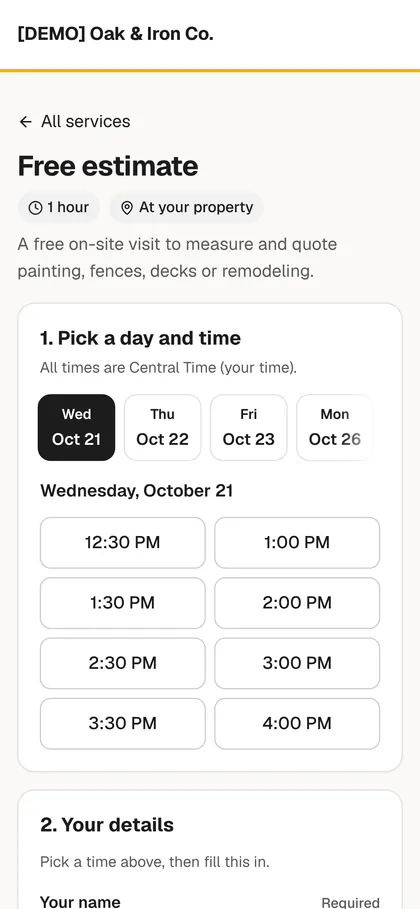
    Your services, your team’s availability and automatic reminders, on a booking page you share on your website and in texts.

  • Google Calendar sync

    Jobs and appointments sync both ways with Google Calendar.

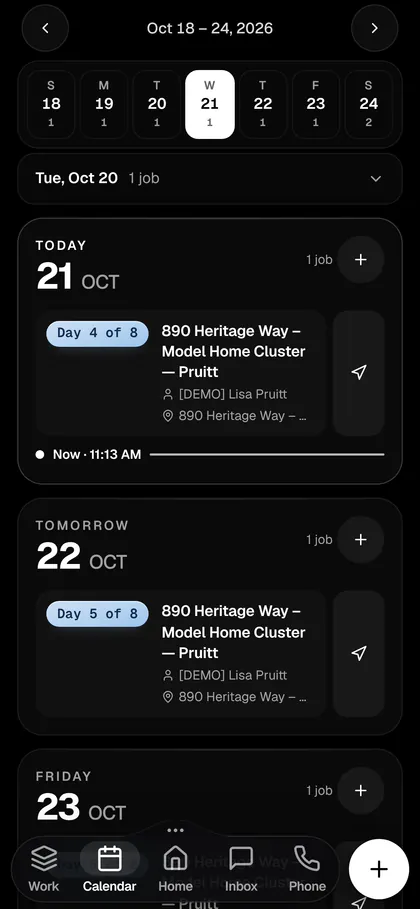
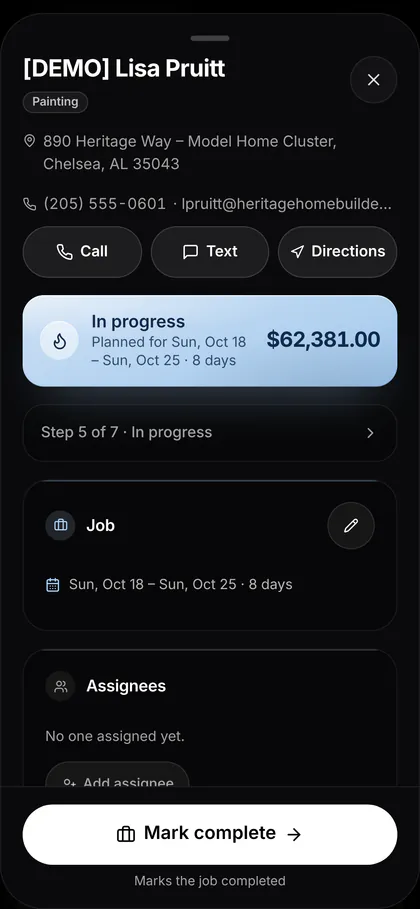
The week on a phone: today’s painting job, day 4 of 8, with directions

Invoices and payments

Get paid in days, not weeks

Turn a finished job into an invoice in one step. Invoices, deposits and reminders carry a Pay now button for card and bank (ACH) payments, and payments mark the invoice paid on their own.

  • Deposits and Pay now

    Ask for a deposit up front and take card or ACH payments from the invoice email, text or PDF.

  • Branded paperwork

    Your logo and details on quotes, invoices, receipts, emails and booking pages.

  • Nothing slips

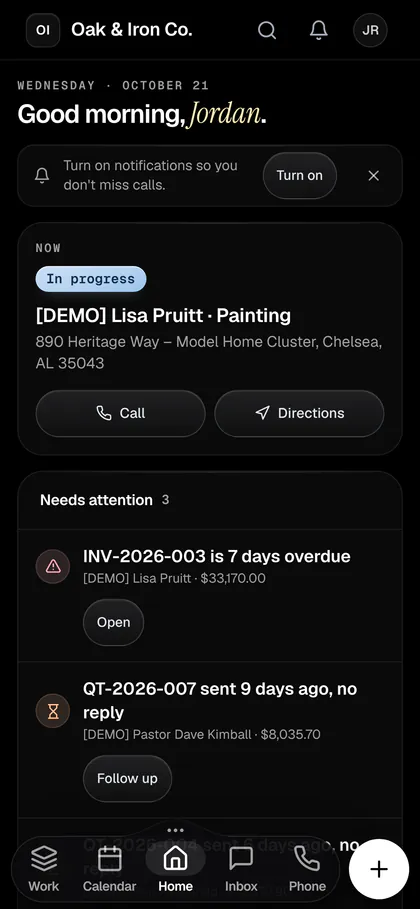
    Overdue invoices are flagged on Home, with a one-tap reminder or an automatic follow-up.

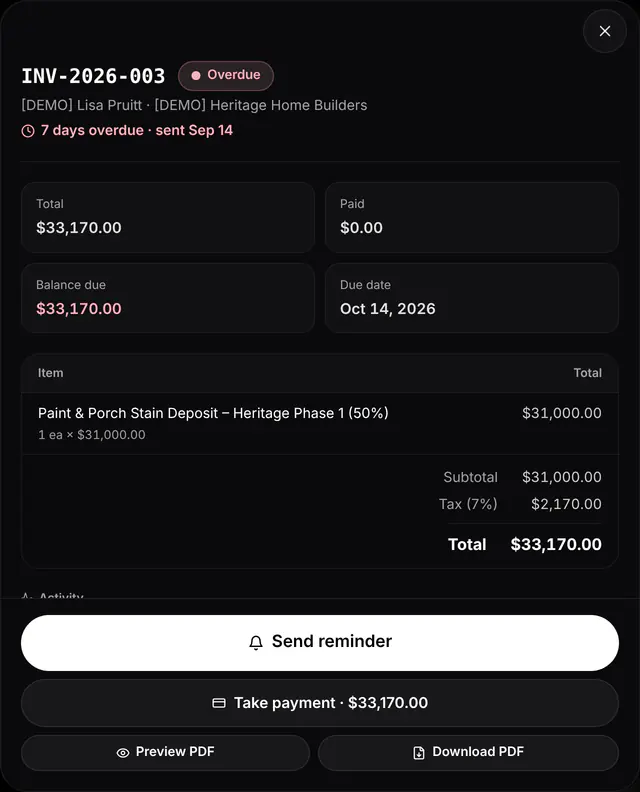
An overdue invoice with total, balance due, a Send reminder button and Take payment

Phone, texting and inbox

Your business line, built in

A business phone number with calling and texting, in the same place as your quotes and jobs. Every call, text and email with a customer lands in one shared inbox.

  • Business number and softphone

    Call from your computer or phone on your business number, with ring groups and business hours.

  • Two-way texting and a shared inbox

    Texts and emails with each customer in one thread the whole office can see. Gmail syncs in.

  • Missed-call text-back

    Miss a call and the customer gets a text right away, so the lead doesn’t call the next contractor.

  • AI receptionist

    Answers calls, books jobs into open times, takes messages and saves each call as a new lead.

  • Business number and softphone

  • Two-way texting and a shared inbox

  • Missed-call text-back

  • AI receptionist

BizForge AI

An AI that does the busywork

Every plan includes BizForge AI credits for the AI receptionist, an AI assistant that takes actions in the app, and AI drafting.

  • AI assistant

    Ask it to follow up on open quotes, schedule a job or find who owes you money, and it does the work in the app.

  • AI drafting

    Drafts quotes, messages and follow-ups in your voice for you to check and send.

  • Credits you control

    Credits are included in every plan, with packs and an opt-in auto top-up that has a spending cap.

  • Bring your own AI assistantBuild and Foundry

    Connect your own AI assistant through MCP or the API.

  • AI assistant

  • AI drafting

  • Credits you control

  • Bring your own AI assistant

    Build and Foundry

Marketing

Fill the calendar from customers you already have

Put a lead form on your website, send a seasonal campaign to past customers, and ask for a review once the job is paid.

  • Lead forms

    A form for your website. Every submission becomes a contact and a new lead on the board.

  • Email and text campaignsBuild and Foundry

    Pick an audience by service, stage or tag, preview it, send yourself a test, then send or schedule it.

  • Review requestsBuild and Foundry

    Send your review link by text or email after the job.

  • Lead forms

  • Email and text campaigns

    Build and Foundry

  • Review requests

    Build and Foundry

Automations

Follow-ups that run on their own

Start from a template, check the wording and switch it on. Automations send texts and emails, create tasks and tag contacts when something happens.

  • Starter workflows

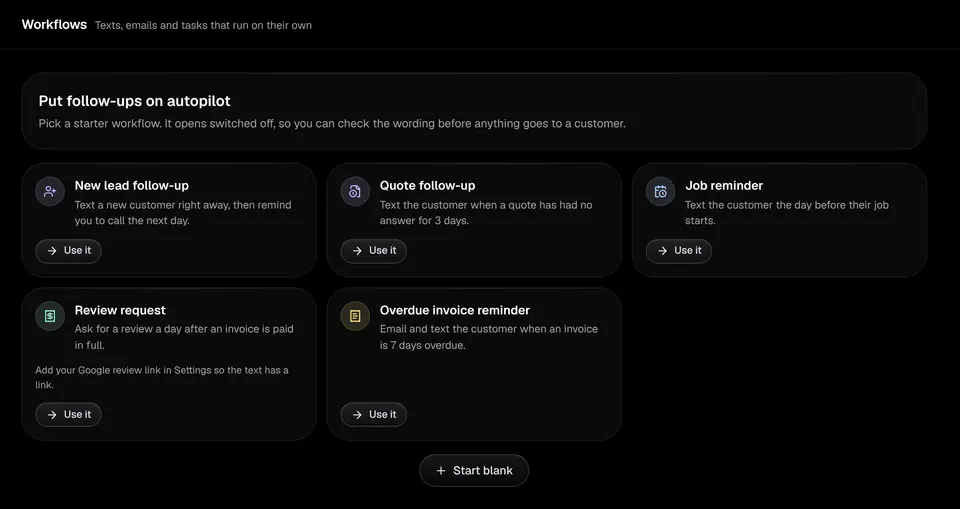
    New lead follow-up, quote follow-up, job reminder, review request and overdue invoice reminder.

  • Real triggers

    New lead, form submitted, stage change, quote approved or unanswered, job coming up or completed, invoice paid or overdue. 5 active automations on Spark, unlimited on the other plans.

  • Safe to try

    Automations start switched off, with a preview and a history of every run.

Workflow templates: new lead follow-up, quote follow-up, job reminder, review request and overdue invoice reminder

Reports

Know your numbers

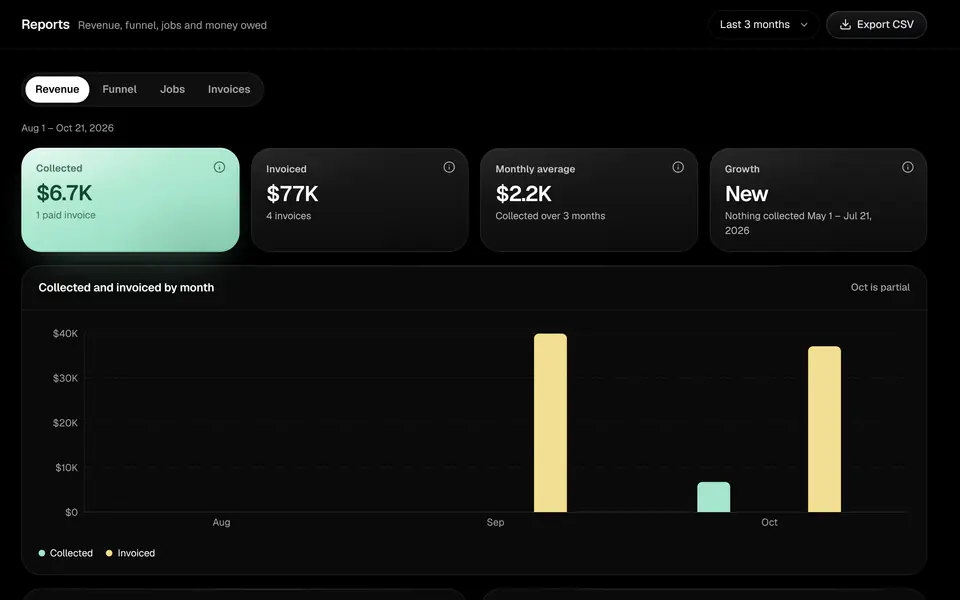
Revenue, pipeline, jobs and money owed, for any period, with the records behind every figure and a CSV export on every report.

  • Revenue and aging

    Collected versus invoiced by month and service, and what is owed by age.

  • Funnel

    How leads move from first call to quoted to won.

  • CSV export

    Download any report for your accountant.

The reports page showing collected and invoiced revenue by month

Crew app

Built for the phone in the truck

The crew app shows today’s jobs. Crews start and finish work, add notes and photos, and call or text the customer, and it keeps working when the signal drops.

  • Free crew seats

    Crew members never see money, and their seats are free.

  • Push notifications

    New leads, texts and calls reach the right phone straight away.

  • Custom roles and permissionsBuild and Foundry

    Decide exactly who sees and does what.

Home on a phone: the job in progress now with Call and Directions, and what needs attention

Connect and switch

Switch without starting over

BizForge connects to the tools you already use, and we move your data for you.

  • Import from CSV, Jobber or Housecall Pro

    Bring over customers, quotes, jobs and invoices.

  • White-glove migration and setup

    We move your data and set up your services, prices and booking page with you.

  • QuickBooks Online syncBuild and Foundry

    Invoices, payments and customers sync to QuickBooks Online.

  • Your own domainFoundry

    Run the app and your booking pages on your own domain, and send email from your business address.

  • Import from CSV, Jobber or Housecall Pro

  • White-glove migration and setup

  • QuickBooks Online sync

    Build and Foundry

  • Your own domain

    Foundry

Trust

Your business data, kept safe

  • Your data stays yours

    Every business’s data is kept separate from every other business.

  • Role-based access

    Built-in roles, plus custom roles on Build and Foundry. Crew never see money.

  • Backed up

    Your data is backed up automatically.

Run your next job on BizForge

Set up your services and prices, send your first quote, and put your booking link on your website.

14-day free trial at launch, no card needed.