Skip to content

The operating system for home-service pros

Measure it, price it, get paidThe CRM, quoting, scheduling and invoicing app for painters, fence builders & remodelers

BizForge turns a site visit into a priced quote the customer signs online, puts the job on your crew’s calendar, and sends the invoice with a Pay now button. Calls, texts and an AI receptionist live in the same place.

Launching soon. 14-day free trial at launch, no card needed. Free crew seats. No contract.

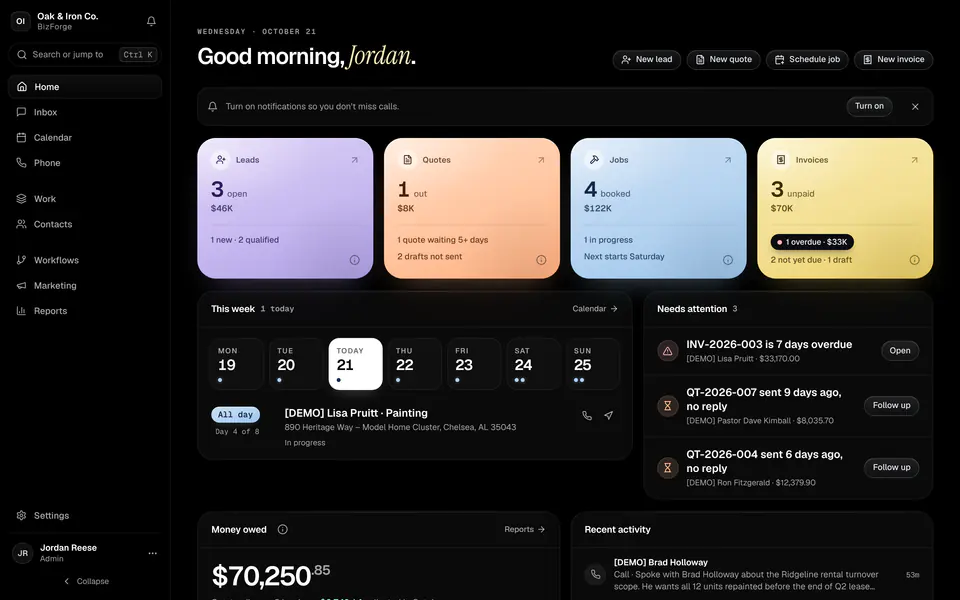
BizForge Home: pastel tiles for open leads, quotes out, booked jobs and unpaid invoices, this week’s schedule and what needs attention
  • Sketch

    Measure on site and the quote fills itself in

  • 1 board

    Every lead, quote, job and invoice, one card each

  • Free crew

    Crew seats cost nothing; you pay for office users

  • Phone + AI

    A business number, texting and an AI receptionist on every plan

Built for residential project trades with 1 to 15 people.

How it works

Lead, quote, job, invoice, paid

Each piece of work moves through the same five steps. Every step uses what the last one already knows, so nobody types a customer’s address twice.

  1. Step 1

    Lead

    A call, text, form or booking becomes a contact and a lead on the board.

  2. Step 2

    Quote

    Sketch and measure on site, price from your book, and the customer signs online.

  3. Step 3

    Job

    The approved quote becomes a job on the calendar with the crew assigned.

  4. Step 4

    Invoice

    Finish the job and send the invoice in one step, with a Pay now button.

  5. Step 5

    Paid

    The payment lands, the invoice marks itself paid, and a review request goes out.

Customers and pipeline

Every lead, quote, job and invoice on one board

The Work board shows each piece of work once, in the stage it has reached: Lead, Qualified, Quoted, Scheduled, In progress, Invoiced, Paid. The totals on top show what is in the pipeline, in production and still owed.

  • Contacts, companies and properties

    Customers, contractors and your own team, with every address, tag, photo, document and the full history in one place.

  • A 7-stage pipeline

    An opportunity becomes a quote, a job, then an invoice. The card moves on its own; nobody re-types anything.

  • Your services, your way

    Painting, fences, decks, remodeling or whatever you sell. Name your service types and filter everything by them.
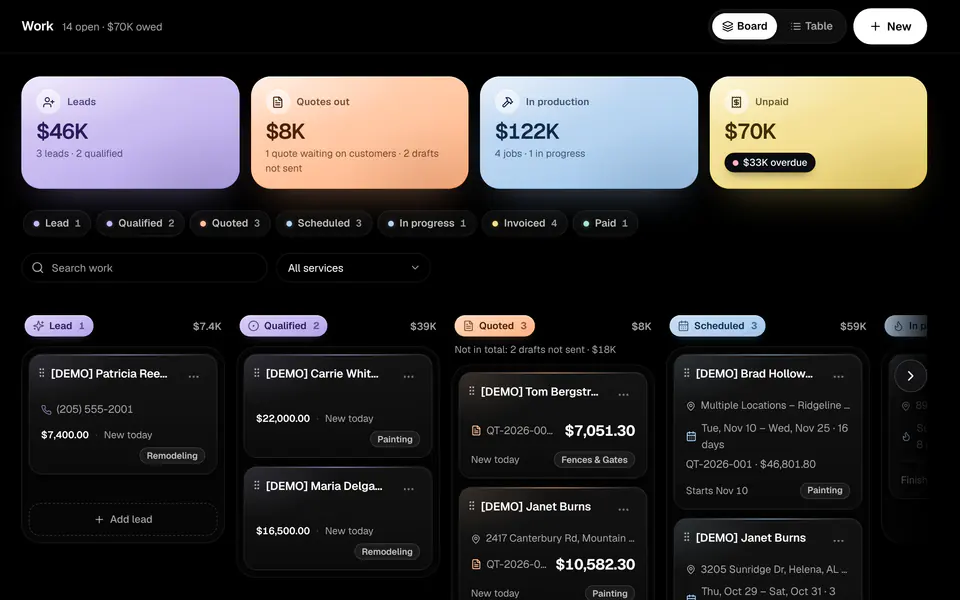
The Work board with lanes for Lead, Qualified, Quoted and Scheduled, and pastel totals for leads, quotes out, production and unpaid invoices

Quotes

Sketch it, measure it, quote it

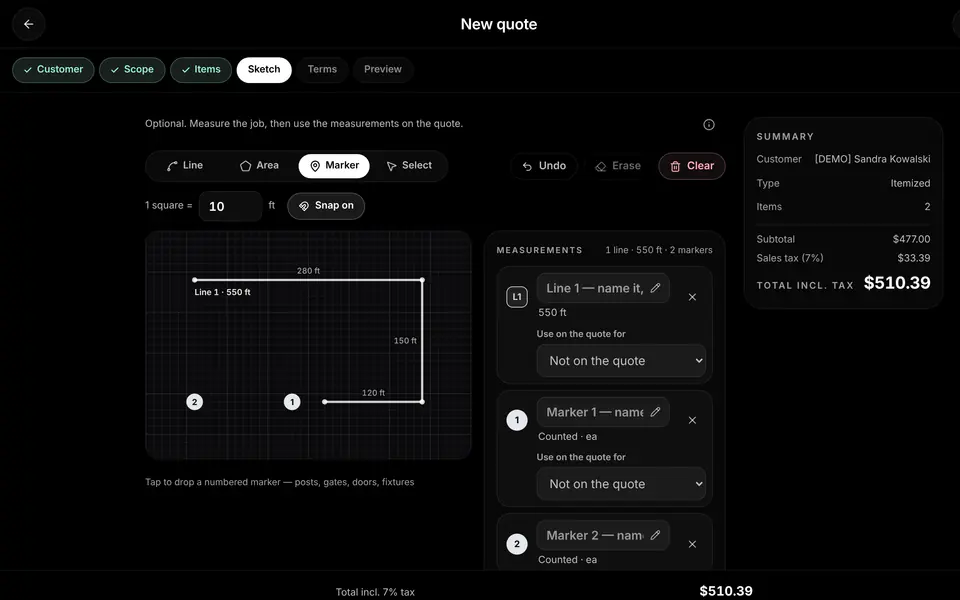
Draw the fence line, the deck or the walls on graph paper at the job site. Each measurement sets the quantity of a priced line, so the quote matches the drawing, and the customer approves and signs it online.

  • Sketch and measure

    Lines in linear feet, areas in square feet, and counted markers for posts, gates and fixtures. Works with touch, pen and mouse.

  • Price book with starter prices

    Starter prices for each trade that you edit once, then reuse on every quote.

  • Templates and options

    Quote templates for the jobs you do every week, good/better/best options and optional add-ons the customer can pick.

  • Online approval and e-signature

    The customer reviews the quote, picks options and signs online. The job is ready to schedule the moment they do.

  • Sales tax your way

    Off by default. Turn it on, set your rate, and mark which lines are taxable.

The quote builder sketch step: a fence line measured at 550 feet with numbered markers, next to a running total

Jobs and scheduling

Crews know where to be

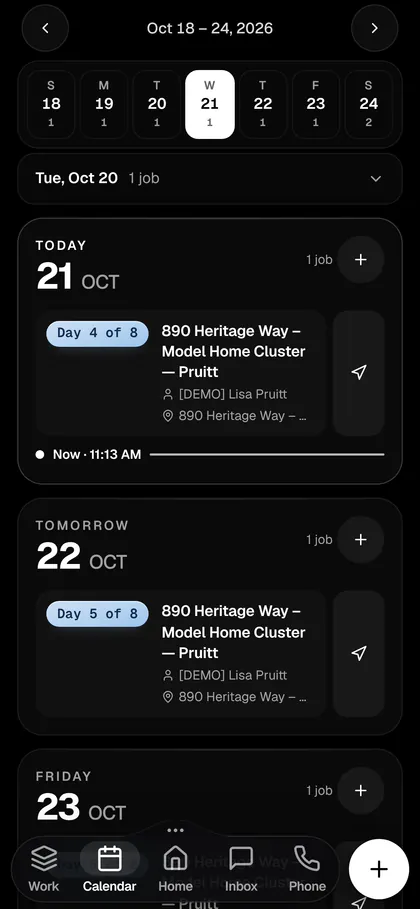
An approved quote becomes a job. Assign the crew, dispatch from the calendar, and let customers book a visit on your own booking page.

  • Jobs, crews and dispatch

    Jobs come straight from approved quotes. Assign crew members, see the week by person and move work around on the calendar.

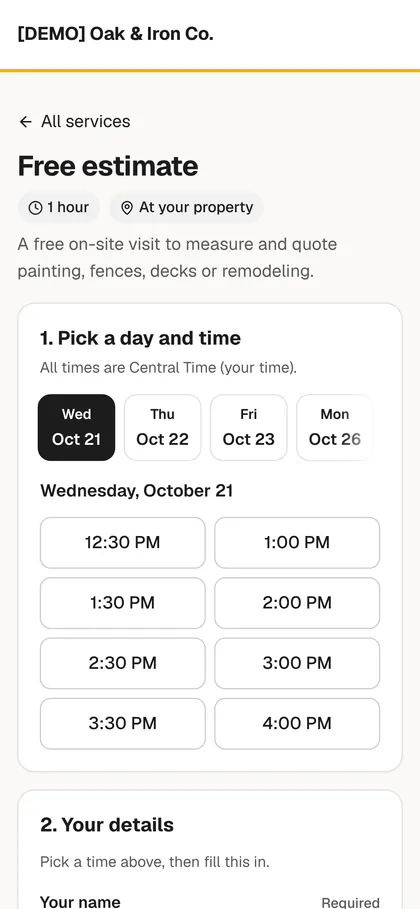
  • Online booking page

    Your services, your team’s availability and automatic reminders, on a booking page you share on your website and in texts.

  • Google Calendar sync

    Jobs and appointments sync both ways with Google Calendar.

The week on a phone: today’s painting job, day 4 of 8, with directions

Invoices and payments

Get paid in days, not weeks

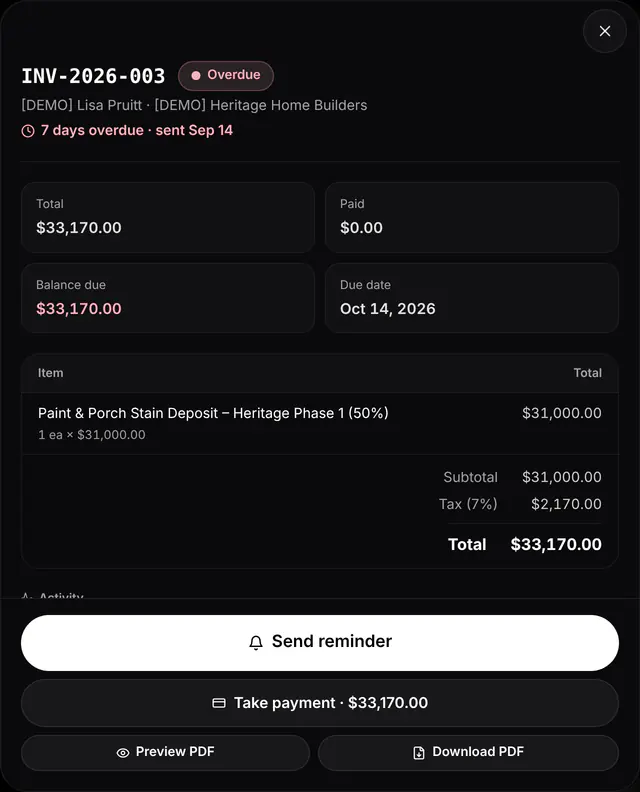
Turn a finished job into an invoice in one step. Invoices, deposits and reminders carry a Pay now button for card and bank (ACH) payments, and payments mark the invoice paid on their own.

  • Deposits and Pay now

    Ask for a deposit up front and take card or ACH payments from the invoice email, text or PDF.

  • Branded paperwork

    Your logo and details on quotes, invoices, receipts, emails and booking pages.

  • Nothing slips

    Overdue invoices are flagged on Home, with a one-tap reminder or an automatic follow-up.

An overdue invoice with total, balance due, a Send reminder button and Take payment

Phone, texting and inbox

Your business line, built in

A business phone number with calling and texting, in the same place as your quotes and jobs. Every call, text and email with a customer lands in one shared inbox.

  • Business number and softphone

    Call from your computer or phone on your business number, with ring groups and business hours.

  • Two-way texting and a shared inbox

    Texts and emails with each customer in one thread the whole office can see. Gmail syncs in.

  • Missed-call text-back

    Miss a call and the customer gets a text right away, so the lead doesn’t call the next contractor.

  • AI receptionist

    Answers calls, books jobs into open times, takes messages and saves each call as a new lead.

  • Business number and softphone

  • Two-way texting and a shared inbox

  • Missed-call text-back

  • AI receptionist

Crew app

Built for the phone in the truck

The crew app shows today’s jobs. Crews start and finish work, add notes and photos, and call or text the customer, and it keeps working when the signal drops.

  • Free crew seats

    Crew members never see money, and their seats are free.

  • Push notifications

    New leads, texts and calls reach the right phone straight away.

  • Custom roles and permissionsBuild and Foundry

    Decide exactly who sees and does what.

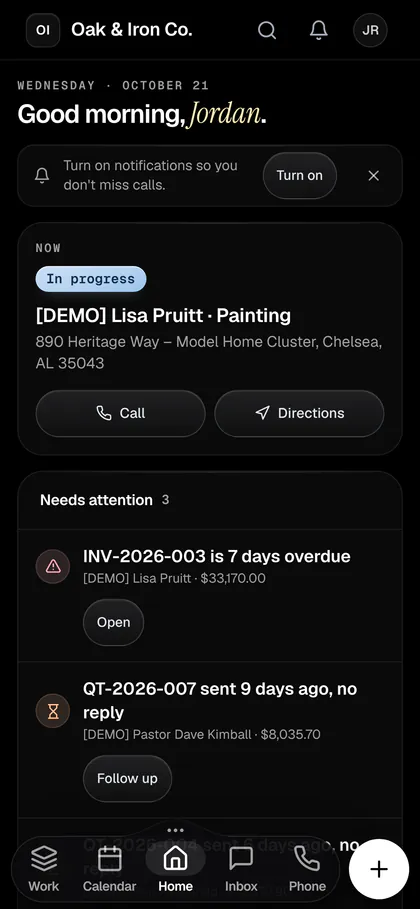
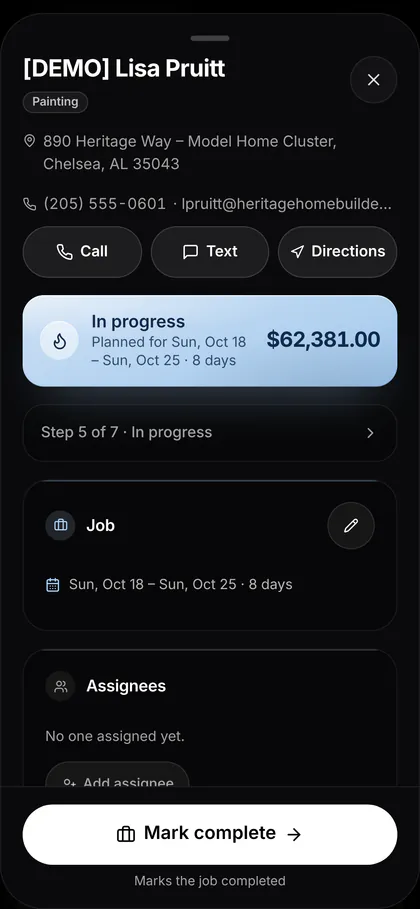
Home on a phone: the job in progress now with Call and Directions, and what needs attention

And the rest of the office

Texts, marketing, automation and reports

Who it’s for

Made for residential trades

Your service types, units and prices are yours. Name them once and every quote, job and report uses them.

  • Painters

    Square feet for walls and ceilings, linear feet for trim, cabinet doors by the each.

  • Fence and deck builders

    Draw the fence line, drop gate and post markers, and offer stain as an add-on.

  • Remodelers

    Bigger jobs, multi-day schedules, deposits and good/better/best options.

  • Handymen

    Lots of small jobs: fast quotes, a full calendar and quick invoices.

  • Gutters and roofing

    Measure runs and areas on the sketch and send the quote before you leave the driveway.

  • Flooring and concrete

    Square footage from the drawing, materials from your price book.

Compare

How BizForge compares

Jobber and Housecall Pro are good products. Here is where BizForge is different, and where it isn’t.

BizForge compared with Jobber and Housecall Pro
FeatureBizForgeJobberHousecall Pro
Draw and measure on the quoteBuilt in: lines, areas and markers set line-item quantitiesNo built-in sketch tool found; map distance tool and third-party appsNo built-in sketch tool found
Calling and textingBusiness number, calling and two-way texting on every planTexting on higher plans; calls forward to your own phoneTexting included; calling is a paid add-on
AI receptionistIncluded on every plan, with AI creditsPaid add-on (included on its top plan)Paid add-on
Crew seatsCrew users are free; you pay for office usersPaid per extra userUser limits per plan; extra users cost more
Email campaignsIncluded on Build and FoundryPaid add-onPaid add-on
Custom rolesBuild your own roles on Build and FoundryPreset levels with per-user permissions on some plansThree fixed roles with per-user permissions
Online bookingEvery planAvailableOn all plans
Mobile app for crewsCrew app in the phone browser; installs to the home screenNative iOS and Android appsNative iOS and Android apps
Free trial14 days14 days14 days
Competitor details from their public pricing and help pages, checked October 2026. Plans change; check their sites. Sources

Trust

Your business data, kept safe

  • Your data stays yours

    Every business’s data is kept separate from every other business.

  • Role-based access

    Built-in roles, plus custom roles on Build and Foundry. Crew never see money.

  • Backed up

    Your data is backed up automatically.

FAQ

Questions, answered

What kinds of businesses is BizForge for?

Residential project trades with 1 to 15 people: painters, fence and deck builders, remodelers and handymen, plus gutter, roofing, flooring and concrete crews. Your service types and price book are yours to name and price, so nothing is locked to one trade.

When can I start using BizForge?

BizForge is launching soon. Join the waitlist for early access and Founding 100 pricing, and we'll email you when your account is ready.

Are calling, texting and the AI receptionist included?

Yes. Every plan includes a business phone number, calling, two-way texting and BizForge AI credits for the AI receptionist. Spark includes 200 call minutes, 300 texts and 100 AI credits a month; the other plans include more.

Do my crews need to download an app?

No app store needed. The crew app runs in any phone browser and installs to the home screen, with push notifications for new jobs, leads, texts and calls. Crew seats are free.

Can customers approve quotes online?

Yes. Customers review the quote, choose any options and e-sign online, and the job is ready to schedule as soon as they do.

Can I bring my data from Jobber or Housecall Pro?

Yes. Import customers, quotes, jobs and invoices from a CSV file, Jobber or Housecall Pro, or let us do it: white-glove migration comes with done-with-you setup.

Do I have to charge sales tax?

Sales tax is off by default. Turn it on, set your rate, and mark which lines are taxable, so you can tax materials only.

Who can see what?

Built-in roles keep money away from crews, and Build and Foundry add custom roles, so you decide exactly who sees and does what.

Is my data safe?

Every business’s data is kept separate, access is controlled by role, and everything is backed up automatically.

Run your next job on BizForge

Set up your services and prices, send your first quote, and put your booking link on your website.

14-day free trial at launch, no card needed.